Ambient Weather Network
- 4.6
- Rating
- 100.00K
- Installs
- Free
- Price

 Analysis by App-foxy
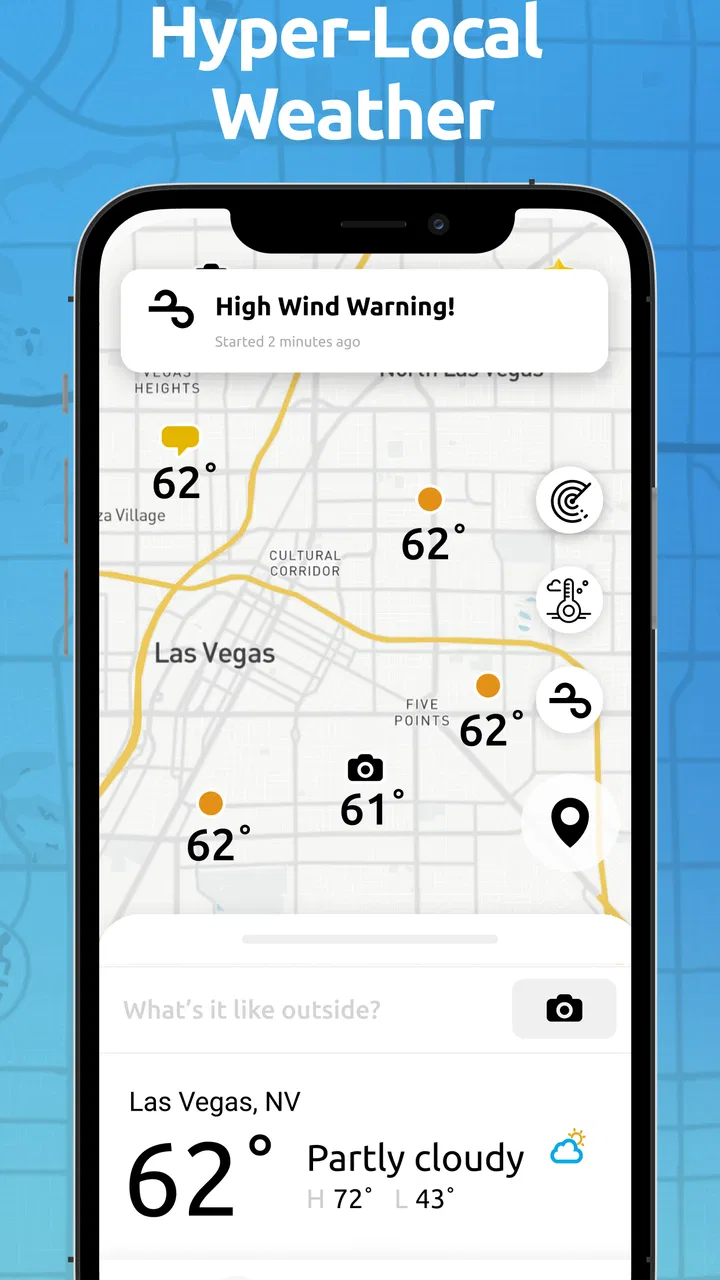
Weather apps usually answer one question: what is the sky going to do where I am? Ambient Weather Network takes a more local, community-focused approach. It is a free weather app from Ambient Weather that connects personal weather information with nearby observations, making it useful when a broad forecast feels too general. After spending time with it, I found the main appeal is not simply another temperature screen. It is the chance to look at conditions through a network of local weather sources rather than relying only on a distant forecast point.
That difference matters in places where weather changes quickly across short distances. A forecast for an entire city may miss the rain falling a few streets away, the wind on an exposed hill, or the temperature difference between a coastal neighborhood and an inland one. Ambient Weather Network is at its best when local context matters more than a polished general forecast. It is also a more specialized choice than the standard weather app already installed on most phones, so whether it belongs on your device depends on how closely you want to follow conditions around you.
How Ambient Weather Network feels in its current form
The app sits in the weather category and is developed by Ambient Weather. Its central idea is straightforward: bring together a hyper-local weather community so users can view conditions from nearby sources. That gives the experience a different rhythm from a conventional forecast app. Instead of checking one official-looking number and moving on, I found myself comparing what was happening in nearby areas and thinking about how local conditions might affect a plan.
You May Also Like

 Blood Strike: 2.5 Anniversary
Blood Strike’s Loadouts Turn Every Drop Into a Tactical Gamble
A close look at Blood Strike’s custom loadouts: how fast access to signature weapons reshapes its battle royale rhythm, rewards preparation, and narrows the gap between fights.

 Pandora - Music & Podcasts
Pandora’s Music Is Easy to Start, but Harder to Recover
Pandora’s strength is its low-effort path from a seed to a station. Its weak spot is how much confidence it asks you to place in connection, setup, and quiet recovery.

 8 Ball Pool
 Is Built on Rivalries, Rematches, and Routine
A close look at the rivalries, rematches, shared routines, and unanswered safety questions that turn a quick pool match into a persistent mobile community.

 Samsung Music
’s Quiet Strength Is Playing What You Already Own
Its reach comes less from spectacle than from dependable access to a personal library. That simplicity is both the app’s strongest retention engine and its ceiling.

 AccuWeather: Weather Radar
AccuWeather Review: A Quick, Clear Forecast for Everyday Decisions
For everyday plans, the best forecast is the one you can understand quickly. AccuWeather makes rain timing, radar, and local conditions easy to act on, with a few trade-offs.

 Hill Climb Racing
Why Hill Climb Racing Still Turns Crashes Into One More Run
A tiny car, a bumpy hill and one more upgrade: Hill Climb Racing keeps resurfacing because its simple chaos makes every near-miss feel personal.
More From Our News Desk



In everyday use, that makes the app particularly appealing for people who spend time outdoors, monitor changing conditions around a home, or simply live somewhere with noticeable microclimates. A runner can use nearby observations before choosing a route. Someone planning gardening work can look for a more relevant local picture than a regional forecast. A family preparing for a drive can compare conditions at the starting point and destination rather than treating one broad forecast as equally accurate everywhere.
The app has a mature presence on Android. It was released on August 15, 2018, and the current version is 4.6.4. Its minimum requirement is Android 7.0, which keeps it accessible to many older devices. I appreciate that because weather tools are often most useful on the phone you already carry, not only on a recent flagship. The trade-off is that an older phone may not deliver the same smoothness as newer hardware, especially if you are moving between several information views.
Its audience also seems clear from its store performance: the app has an average rating of 4.6 from around 3.9 thousand ratings, with more than 100 thousand installs. Those figures suggest a solid, established user base without making it feel like a mass-market replacement for every weather service. The Everyone content rating is appropriate for the subject matter, and there is no age-related barrier for ordinary household use.
A useful companion rather than a universal replacement
I would not install this expecting it to replace every weather tool on my phone. A basic forecast app is usually quicker when I only need tomorrow’s temperature or a simple rain indication. Ambient Weather Network earns its place when I want to investigate what is happening locally and use observations as part of a decision.
That distinction is important. The app’s value grows with the quality and relevance of the local information available to you. In a well-covered area, the network can feel much more informative than a single generalized forecast. In a place with fewer nearby sources, the experience may feel less immediately useful. This is not a flaw that can be solved by changing a setting; it is part of the trade-off built into a community-oriented weather product.
What changed for the current version
The current version, 4.6.4, is the clearest verified marker of the app’s present state. I would read that as evidence of an actively maintained product rather than a forgotten utility, but I would avoid assuming that a version number alone means a dramatic redesign. The important point for an existing user is continuity: the app remains centered on local weather information and community connection instead of abandoning that identity for a generic forecast interface.
For someone returning after time away, the sensible approach is to update and then judge the current experience by the tasks that matter: finding nearby information, checking whether the local picture is useful, and deciding whether the app adds something beyond the phone’s built-in weather option. I would not reinstall solely because of the version number. I would reinstall if local observations are valuable to my routine or if I want a second perspective on rapidly changing conditions.
There is also a practical financial detail. The app itself is free, but it includes in-app purchases ranging from $4.99 to $99.99 per item. That makes it important to distinguish between downloading the app and committing to optional paid elements. I would begin with the free experience and only consider spending money after understanding exactly which part of the service improves my own workflow. A high-priced optional item is difficult to justify for someone who checks weather casually once or twice a day.
How I would use it during a normal day
Imagine I am planning an early outdoor appointment. Instead of checking a regional forecast once before bed, I would open the app in the morning and look at the local situation around both my home and the place I am heading. If the two areas show different conditions, that difference becomes useful information in itself. I might leave earlier, change clothing, protect equipment, or choose a route with less exposure.
The same workflow works for a weekend project. Before painting outside, cycling, photographing a landscape, or setting up a garden task, I would use the network to see whether nearby conditions match the broad forecast. The non-obvious advantage is that the app encourages a location-to-location comparison. It helps me question whether a citywide prediction really describes the specific place where I will spend time.
For people who operate a home weather setup connected to the wider Ambient Weather ecosystem, the community angle can be especially meaningful. The app is not just a passive forecast window; it is designed around a network of local weather information. That creates a more participatory feel than a conventional app that only presents data from a central provider.
My practical tip is to avoid treating the nearest observation as automatically perfect. Use it as a local clue, then compare it with the broader forecast and your own view of the sky. A nearby source can be more relevant than a distant one, but it can also represent a slightly different elevation, surface, or exposure. The best decisions come from combining those perspectives rather than following one number blindly.
Where it beats ordinary weather apps
The clearest advantage over a standard weather app is granularity. Ordinary apps are convenient because they reduce weather to a familiar location and a clean forecast. Ambient Weather Network is more interesting when that simplification hides meaningful differences. The community-based view can help reveal why conditions near a river, open field, hillside, or dense neighborhood do not always match the forecast shown for the wider area.
It also supports a different kind of confidence. A single forecast can tell me what is expected, while local observations help me understand what is actually happening nearby. Those are not interchangeable. For outdoor planning, the combination is stronger than either one alone. This is one of the app’s most useful conceptual strengths, and it is easy to miss if you judge it only as another icon showing temperature.
Another advantage is relevance for users who care about their immediate surroundings rather than a long list of cities. Travelers may prefer a broad forecast service with extensive destination coverage, while a homeowner, hobbyist, or local outdoor enthusiast may get more value from detailed nearby context. The app’s focus makes it less universal, but also more distinctive.
Where the usual alternative may be better
If I only want a quick glance at today’s conditions, the built-in weather app or a familiar mainstream alternative is probably faster. Those apps often prioritize simplicity, broad forecast coverage, and a polished summary. Ambient Weather Network asks me to engage more actively with local information, which can feel like unnecessary effort when I am deciding whether to take an umbrella for a short walk.
It is also not the first choice I would make for someone who needs a single authoritative source for severe-weather decisions. Local observations are valuable context, but they should not replace official alerts or emergency guidance. For serious hazards, I would use the relevant official service alongside this app rather than treating community information as a complete safety system.
There is a similar limitation for travelers. If I am moving between many unfamiliar places, I may prefer an app designed around broad international forecasts and fast location switching. Ambient Weather Network makes the most sense when the local network around the place I care about is useful and when I am willing to inspect conditions rather than just read a summary.
Small frictions that affect the experience
The community model naturally introduces unevenness. The usefulness of what I see depends on how much relevant local information is available and how closely it represents my exact surroundings. That means the app can feel excellent in one location and merely adequate in another. It is a genuine limitation, not something a better-looking interface can completely remove.
There is also a learning curve compared with a basic weather widget. A widget gives me an answer immediately; this app rewards curiosity and comparison. New users may need a little time to understand which local observations are most relevant to their home, route, or activity. I consider that a fair exchange for more detail, but it means the app is not ideal for people who want zero decisions after opening it.
The optional purchase range is another point to consider. Free access makes trying the app easy, but the presence of purchases from $4.99 up to $99.99 means I would pay attention before confirming anything. For casual users, the free portion may be enough. For committed weather enthusiasts, additional paid elements may be worth investigating, but the decision should be based on a clear recurring need rather than the assumption that spending more automatically improves every weather check.
Who should install it
I recommend Ambient Weather Network to people who want hyper-local weather context and are willing to look beyond a single generalized forecast. It is a good fit for outdoor hobbyists, gardeners, local commuters, homeowners, and anyone whose plans are affected by conditions that can vary across a small area. It is also appealing to users who like the idea of participating in or observing a weather-focused community rather than consuming only centrally prepared predictions.
I would be more cautious recommending it to someone who wants a minimal weather widget, a simple hourly glance, or extensive destination coverage while traveling. Those users may be happier with a conventional forecast app. I would also tell anyone making safety-critical decisions to use official warnings and local authorities as the primary reference. This app can add useful context, but it should not be the only source for serious weather risk.
Before deciding, I would ask myself three practical questions. Do I regularly need conditions for one specific area? Do local differences affect my plans? Am I willing to compare observations instead of accepting one forecast at face value? If the answer to all three is yes, the app has a strong reason to be installed. If not, its specialized approach may feel like extra work.
What existing users should watch next
For current users, I would watch how consistently the app continues to make local information easy to interpret. The most valuable future progress would be improvements that reduce the effort between opening the app and understanding which nearby observations matter for a particular decision. Clearer context, dependable navigation, and smooth handling of local sources would strengthen the product without changing its core purpose.
I would also watch the balance between free access and optional purchases. The app’s free entry point is important because it lets people test whether their area benefits from the network. Any paid element should feel like a meaningful choice for a specific type of user, not a requirement before the basic weather experience becomes useful. That balance will matter especially for households that want local information without turning a simple weather habit into a large expense.
Finally, I would keep an eye on how well the app serves both sides of its audience: people who simply want to observe nearby conditions and people who are deeply invested in local weather data. If the experience remains approachable for beginners while preserving enough depth for enthusiasts, it can continue to occupy a useful middle ground between a basic forecast app and a dedicated weather-monitoring setup.
My final view is positive, with a clear qualification. Ambient Weather Network is not the weather app I would choose for every person or every situation, but it offers a genuinely different perspective from a standard forecast screen. Its strongest feature is the way it brings local observations into everyday planning, especially when conditions vary noticeably from one neighborhood to the next. The free download makes it easy to test, and the current version shows that the product is still being maintained.
I would install it alongside a regular forecast app rather than immediately replacing one. Use the conventional app for speed, use this one when local detail matters, and rely on official sources for serious warnings. That combination reflects the app’s real strength: it turns weather checking from a single forecast glance into a more informed local comparison. For the right user, that is a worthwhile upgrade in how weather decisions are made.
FAQs for Ambient Weather Network
01What is the Ambient Weather Network app?
The Ambient Weather Network app is a comprehensive tool that provides real-time weather updates, forecasts, and alerts. It connects to your personal weather station to deliver hyper-local data and offers features like custom alerts and integration with smart home devices. It's available for both Android and iOS.
02How does the Ambient Weather Network app connect to my weather station?
The app connects to your weather station via Wi-Fi, allowing it to access data such as temperature, humidity, wind speed, and more. Make sure your weather station is compatible and properly configured to share data with the app. Detailed setup instructions are available within the app.
03Can I customize the alerts in the Ambient Weather Network app?
Yes, the app allows you to customize alerts based on various weather conditions. You can set up notifications for temperature changes, high winds, rain, and more. This feature helps you stay informed about severe weather conditions specific to your location.
04Is the Ambient Weather Network app free to use?
The Ambient Weather Network app is free to download and use, but certain features may require a subscription or in-app purchases. Check the app store listing for details on any available premium features or subscription plans that might enhance your experience.
05Does the Ambient Weather Network app integrate with smart home devices?
Yes, the app integrates with various smart home devices, allowing you to automate tasks based on weather conditions. For example, you can connect it to smart thermostats or irrigation systems to optimize their functionality according to real-time weather data.
Pros
- User-friendly interface for easy navigation.
- Real-time weather updates and alerts.
- Customizable weather stations for precision.
- Integrates with smart home devices.
- Detailed data visualization with graphs.
Cons
- Requires stable internet for updates.
- Limited offline functionality.
- Subscription needed for premium features.
- Some features may drain battery quickly.
- Occasional sync issues with devices.

Ambient Weather Network
Gallery